redline
A tmux-style top bar for GNOME
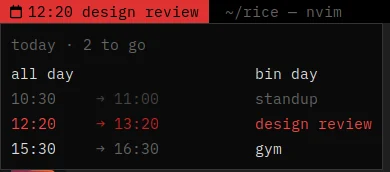
A GNOME Shell extension that turns the top bar into something like tmux’s status line: a tag block on the left with what’s next today, workspaces as tmux windows, the focused window’s title, now playing, and a right side that stays empty until something needs attention: cpu/mem only when they’re high, device batteries, and red live / rec / mic off tags while the screen is shared or the mic is muted.
Details
- The tag’s data comes from a source module: my day planner’s CLI when it’s installed, otherwise GNOME’s calendar. The calendar source reads the clock menu’s own event source, because the calendar server keeps a single time range and a second client would empty the first one’s events.
- GNOME’s quick settings and clock stay, moved right and restyled, with their status icons gated: Wi-Fi only when the signal is weak, volume only when muted, no night-light or notification icons.
- Wayland can’t restart the shell, so a test script runs the bar in a throwaway headless GNOME Shell on its own D-Bus session, with fake UPower, MPRIS and calendar servers. It screenshots the panel and cycles disable/enable the way the lock screen does. Its XDG dirs have to be set before dbus-run-session or dconf writes land in the live settings, so two guards abort the run if isolation fails.
- Hovering a pair of Nothing earbuds’ battery drops a card to switch noise mode, codec and multipoint, over the buds’ own Bluetooth protocol, no app needed.
- Scripts can’t show GNOME’s OSD box themselves, so redline-osd writes a file the bar watches. Unlike notify-send, it shows under Do Not Disturb.